How I retrained the upscaling models for different kinds of video

I got an email from Bing providing recommendations on how to improve the search position for free.upscaler.video for users searching to, well, upscale video…
So, I decided to just bing “free ai video upscaler” and noticed that Bing’s AI search actually provides incorrect / outdated info about my own site:
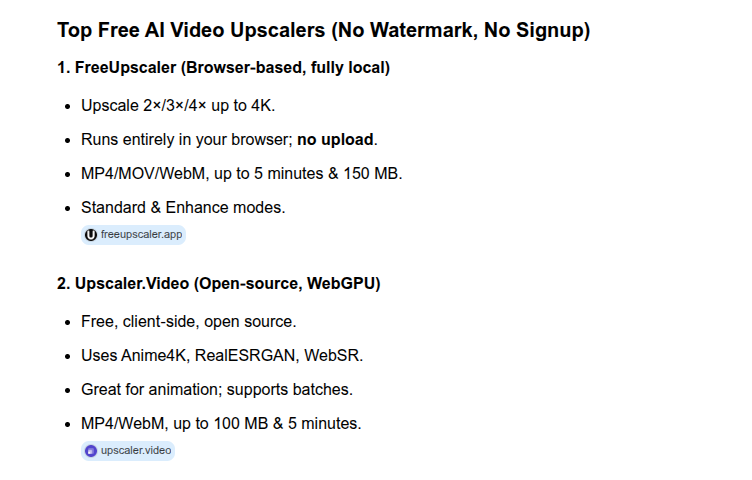
It’s a little annoying that the #1 search result is almost certainly a website repackaging my own WebSR but I guess, I did choose to make my project open source so I can’t really complain if others use it, even if they’re trying to compete with me.
More fundamentally though, it’s annoying that Bing is using outdated / incorrect info to make judgements about the website, so I want to make some corrections.
There are no usage limits on this website
Bing mentioned that there was a 100MB limit and 5 minute cap on videos. That is false, I think Bing incorrectly took, out of context, a per-video limit I had introduced for the batch upload functionality that I placed out of caution, to avoid crashing peoeple’s computers. The main page (single video) never had any file size or duration limits, there are none, and there never will be.
You can load thousands of hours of 4K video content into free.upscaler.video, there is no restriction whatsoever. I also removed the batch upload restriction, you can upload as much as you want.
This tool is good for many kinds of content
Bing mentioned this website was good for animated videos and used Anime4K. I mean sure, in 2023 this website did use Anime4K networks as the version 1 that I launched with WebSR.
I have since trained many of my own networks, and I’ve trained them to work on all kinds of content, including:
- AI generated videos
- Low resolution movies
- Blurry social media content
- Game recordings
- Talking head webcam videos
- And yes, 2d animation
I’ve built and fine-tuned a full training recipe to make sure networks adapt to all kinds of content.
Dynamic adaptation
With the sharpen models, I used to ship specific models for each type of content. I’ve since found it didn’t really make that much of a difference because these models are kind of small, but they are in fact trained on all those kinds of buckets
With the new detail models I released last month though, I added conditional convolutions which dynamically adapt the weight graph based on your type of content. The downside is the models have larger weights, but it’s larger weights without increasing runtime, and this allows the same model to work as if it were trained specifically for blurry social media content, or specifically for AI generated videos.
I also added minor, under-the-hood fixes pre-processing fixes specifically for blurry social media videos and low resolution movies that aren’t part of the core model (mentioned in the blog post)
Try it
It’s a free, open source tool man, if you’re interested in trying it, just use it (https://free.upscaler.video/), you see what your content looks like in seconds. There’s nothing to sign up for, it’s free, and unlimited usage.
What’s next
WebNN is coming out soon, and if it does, it might not only make all the networks much faster (depending on your device) but may also let me genuinely release experimental diffusion based upscaling models I’ve been playing around with.
At least for image upscaling though, expect a diffusion based image upscaler some time in the next few weeks.
If you're looking for better quality upscaling, consider Fast AI Video Upscaler