New AI models, batch upscaling and smarter processing

I don’t know if anyone reads these, but in case you do, I want to emphasize that yes, I am absolutely continuously work on Free AI Video Upscaler. Here’s a few changes I released over the last few weeks:
Two kinds of AI model: Sharpen and Detail
In the past, I used just one family of AI models, listed as “Fast”, “Balanced” and “Quality”, these were just different sizes of AI models trained the same way. Consequently, it was hard to see any real differences between “fast” and “Quality” unless you were really paying attention.
I also previously ported RealESRGAN as an “Ultra” option to test the waters, but that was too slow to run even on high end Apple silicon devices, though because RealESRGAN and similar projects like BasicVSR are trained using a different pipeline and using a GAN objective, the results look qualitatively different, with more realistic textures though sometime with a “plastic skin” effect.
That said, I’ve been A/B testing models enough in Fast AI Video Upscaler, the paid counterpart to this tool, to know that the “GAN” based models are highly preferable. I’ve thus trained a new family of models, the “Detail” models, which follow the same training style as BasicVSR and RealESRGAN, but built with a much more performant, browser friendly architecture which runs 15x faster than say RealESRGAN, with minimal quality difference (LPIPS 0.01)
From a user perspective, this means you can now choose from two variants:
- Sharpen restores crisp edges. These are small, fast convolutional networks (the models the upscaler has used since launch), good for compressed or slightly soft video. Default for video.
- Detail recreates fine texture: hair, skin, fabric, foliage. These are GAN models, using the same training pipeline as BasicVSR and RealESRGAN
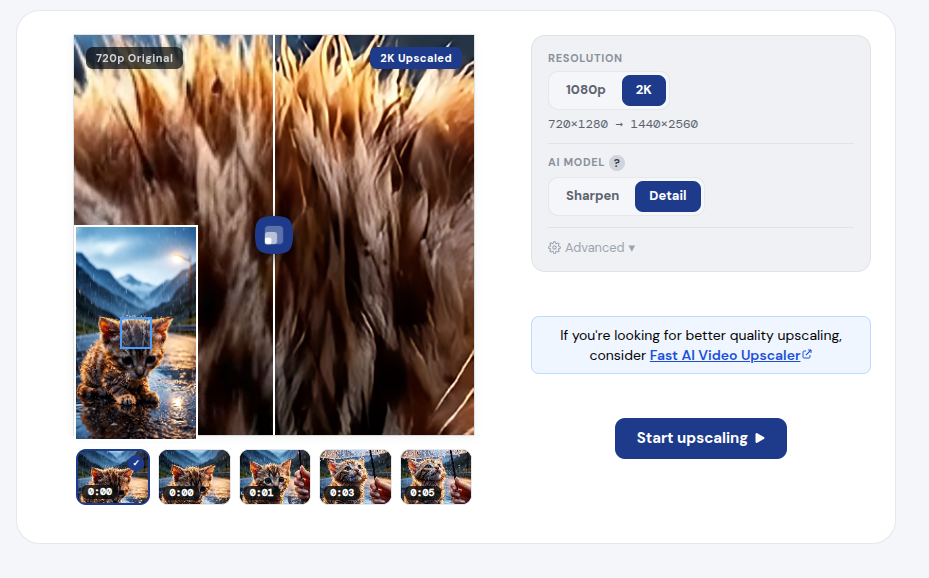
Each kind still comes in three sizes (small, medium, large), tucked under an “Advanced” toggle. The defaults are Sharpen-medium and Detail-small.
To achieve a 15x speed up, of course trade-offs have to be made, and one of them includes (1) These were trained on a 2x upscaling objective, I tried training 3x and 4x upscaling variants and it was too hard for these small models, (2) The weights are actually bigger than say RealESRGAN or BasicVSR, because I used some techniques that do dynamic content routing, which uses different parameters and weights for say, 2d and animated content vs face heavy content vs AI generated videos etc…
Fast AI Video Upscaler has a 3rd family of models, diffusion models which get even better performance on blurry content, but diffusion video upscaling models would genuinely be a herculean task to run in the browser client side, not least because we’d be talking about model weights which are on the scale of several GB (vs several Megabytes) and also require more video memory than WebGPU would make available.
I am doing my best, and it’s possible I’ll add a diffusion based image upscaler, a distilled 500MB download + wait 1 minute for one image seems just about at the edge of doable. If WebNN becomes popular, and enables int8 quantized graphs and simd-style matrix multiplications, a distilled diffusion upscaler might be just about feasible on high end apple silicon and dgx spark devices, but that’s a very tiny fraction of users and genuinely a lot of work, so like, please be patient, I am trying to fight physics and do R&D to improve a free open source project.
Batch upscaling: up to 10 videos at once
A lot of people have asked for this, so I’ve finally just built the feature. You can now pick “Upload multiple files” (or drop several videos onto the page) and queue up to 10 videos:
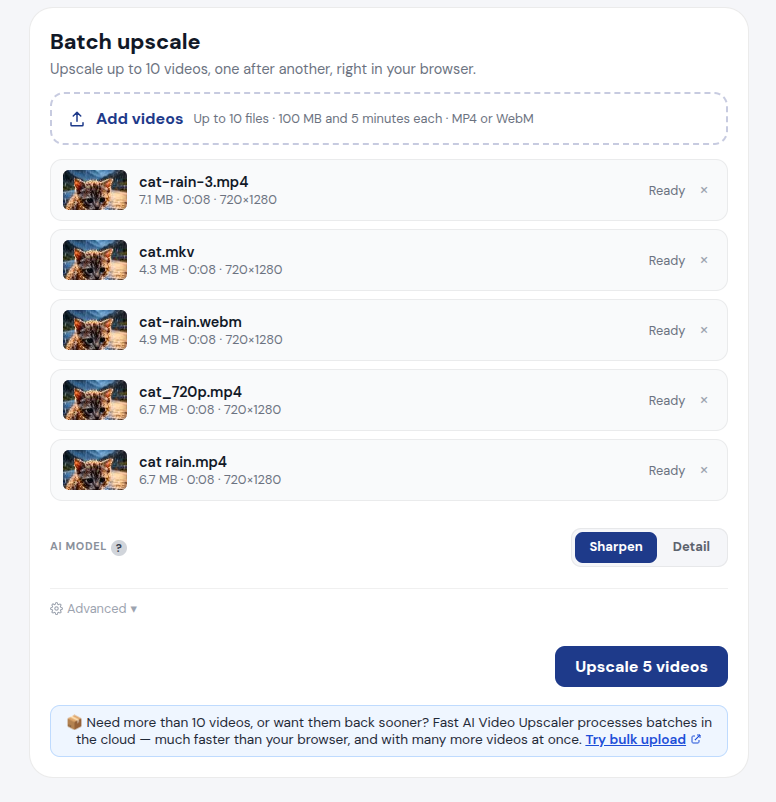
- Each file gets a thumbnail, its duration and resolution; files that won’t work are flagged before you start.
- Limits per file: 100 MB and 5 minutes, MP4 or WebM (MKV in Chrome, Edge and Firefox). These keep the browser from running out of memory.
- Videos are upscaled one after another, each with its own progress bar and download button, plus “Download all”.
- It’s free, like everything else here. Batch upscaling is on desktop for now.
The limits are mostly there as safeguards against browser crashes and browser memory.
If you have more than 10 videos, or long ones, the paid version (Fast AI Video Upscaler) processes batches on cloud GPUs, which is much faster and handles far more videos at once.
Automatic detection of already-upscaled video
This is probably one of the most controversial-sounding changes, but it’s also the most absolute no-brainer in terms of improving the tool.
After debugging a lot of videos for customers on Fast AI Video Upscaler, I realized that a huge fraction of users try to upscale or increase resolution of video with dumb resizing programs, so you’ll get a 360p video upscaled to 4K using bicubic upscaling.
They then take that “4K” video, and then come to free.upscaler.video, and then complain when this tool doesn’t make that video look like 8K (see comments like this).
These AI models won’t work if you take a 360p video, use some video editing program to export it at 4K, and then try to upscale that to 8K. Because of how these, and every other AI model available right now work, they’ll do a passable job if you give the original 360p video, but if you feed in blown up video, it is garbage in, garbage out.
After realizing this, in the paid version, I started monitoring how many videos could be downscaled without losing any visually distinguishable information (99.5% SSIM) and more than 45% of videos fit that description.
I then just started downscaling videos before applying AI models in the preview and in the output, and revenue jumped by 80%, it was the single most impactful change in the paid version.
It sounds nuts, and it sounds actively deceptive to downscale user videos before upscaling them, but that’s actually the correct thing to do here to provide better quality output, and concrete hard market data trumps any theoretical argument you could have against it.
Significantly more poeple pay money, out of pocket, when I first downscale before upcaling, compared to just upscaling the video they upload, so like what does that tell you?
It improves the output video quality significantly, and also processes faster, so like it’s an complete no-brainer.
What’s next
A lot of people have been confused about the free/paid flow, and so very soon, I’ll be changing the free/paid mechanism to be much more up front and explicit: Free is “local processing”, happens in your browser, for free unlimited use, the only limitations are from your browser. “Cloud” processing, is what it is, fast cloud processing on GPU servers, pay for use.
I’ll be revamping the whole flow to make all of that explicit, to make sure that if you come to this website to enhance or upscale a video, that you are able to get exactly what you are looking for, and if there is any friction (like, cloud processing requiring payment) it is a limitation of physics, not any artificial restriction to improve conversion.
It’s the same approach I’ve taken for all these other free, open source, no-sign-up tools here.
As always, if something looks broken, tell me.