Free AI Video Upscaler 2.0

No one wants to read a bs company blog change-log, and I don’t want to write one, but if you had ever tried free.upscaler.video before September 2025, you’d notice a lot of things have changed.
I’m announcing “V2” not because of some features or whatever, but mostly because I finally started taking this project seriously and fixed a ton of issues and made a ton of improvements, so that it’s no longer a janky side project I built and forgot about, and instead now a useful, dependable tool that actually works and is used by thousands of people a day.
Why this tool used to suck (before I fixed it)
I have an actual background in AI from Columbia and MIT, several research papers and a patent.
After grad school, I started my first startup as an e-learning app in West Africa, which was never profitable, and several years & pivots later, we ended up building an SDK for AI video features (like virtual backgrounds, background noise removal) for Video conferencing apps, and we were acquired during the pandemic.
A lot of the reason we were acquired was because we learned how to optimize and deploy neural networks directly in browsers via WebGL, and we showed how our tech was 10x better than what Google had at the time. (Google later copied our approach in 2023)
In 2023, the successor to WebGL (called WebGPU) came out, and I wanted to practice writing Neural Networks in WebGPU, since it was still a niche but super useful skillset. AI Upscaling just happened to be one of the simplest possible tasks to write Neural Networks from scratch for.
Free AI Video Upscaler started as a simple throwaway hobby project to practice writing neural networks in WebGPU, I built it over a few evenings (9pm to 2am) between Christmas and New Years 2023 while visiting my in-laws.
I didn’t really care if it didn’t work for the 50% of people coming to the website who didn’t have the latest version of Chrome/Edge with WebGPU, it was just a toy learning project that I shared in a reddit post.
I didn’t even bother coming up with a name for it, I just called it Free AI Video upscaler because that’s what it was. It’s not that deep bro.
People kept using it despite the issues
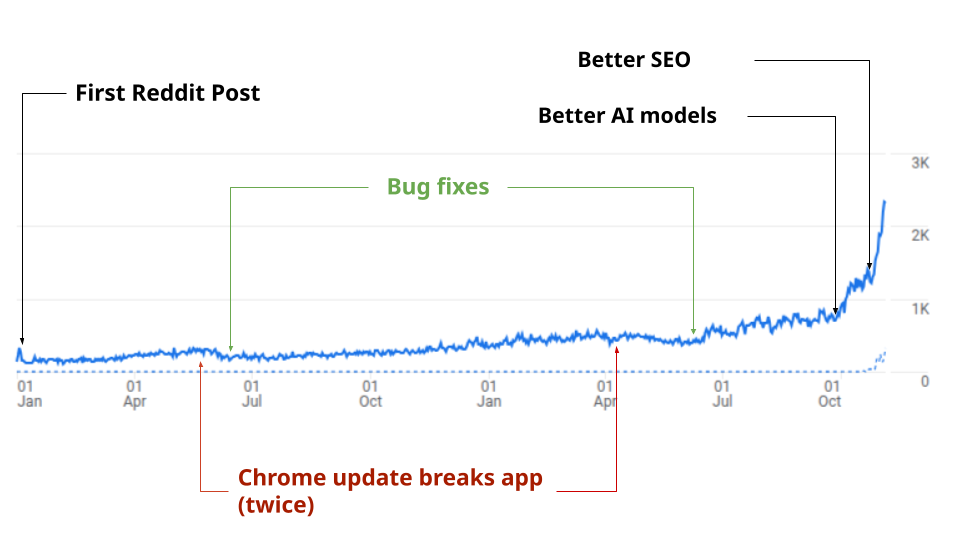
The first thing that popped out was that the reddit post quickly got 100+ up votes within 2 days. The only logging I added was Google analytics, but it showed that I had about 100-200 people per day coming to the site and using the tool.
It just stayed as a side project, but if you track the actual growth, it was growing 15% Month over Month on it’s own. I still don’t even know why, I just left it alone and worked on other things for the better part of the last 18 months, though I see that other people had quietly submitted my tool to various “AI Tools” databases (Without my knowledge) and then from earlier this year, ChatGPT started recommending my tool to users, and my tool became the #1 result for “free upscaler” on Bing (and I had no idea until I started taking this seriously and looking into the traffic)
I thought I had better things to do
In the meantime, I was working for the company that acquired my startup, and then in July 2024, when my acquirer was itself acquired, I started a new startup
I added this issues/suggestions feature, and it was actually really annoying because I kept getting complaints from users about the site not working (Chrome broke my website twice, once in 2024 and then in 2025), various bugs / whatever, and I didn’t really want to fix the bugs because
- I had a family
- I had a job
- This was a free tool that no one was paying me to fix or maintain
I also have an AI background from Columbia and MIT, and I wanted to work on more interesting AI research problems, not some random free utility tool on the internet.
Taking this thing seriously
It wasn’t until fixing the 2nd breaking Chrome bug in July 2025 that I actually looked into the analytics and realized that my tool had inadvertently grown to 30k monthly active users on it’s own, despite the bugs and despite no effort and complete feet-dragging on my part to do anything to improve the tool.
It wasn’t lost on me that my actual startup AI tool to edit podcasts had 1% the traffic of this free upscaling tool, so I decided to finally start taking things seriously and made some improvements
Here’s actually what I did
Step 1: Fix the bugs
There were and have always been a ton of tiny little bugs in this tool that have been there since the beginning, almost all of them to do with the fact that this is a tool that does all the video processing in your browser via APIs like WebGPU and WebCodecs, the latter of which is notoriously inconsisent across browsers and devices.
Different browsers on different devices behave differently, and so you’ll see so many lines of code in my app are to handle random edge cases like Edge on Android, Firefox on iOS, Safari on Mac OSX v24 and lower. Each combo is only a small fraction, and many of those “errors” in my app were actually errors from the browsers (like, I have a line of code to fix a bug with Edge on Android because Microsoft hasn’t fixed a particular bug in Edge for Android), and you could be like “well who uses Edge on Android?” but together all of these tiny edge cases added up to a lot of errors, and so I’d been silently working in the background to fix them over the past couple of months.
As a user you don’t think about these things, if you go to the tool, you click a button and nothing happens, you just bounce and go to another tool. You don’t see that I’ve spent days/weeks testing my website extensively across device/browser combinations with different test videos with the 30+ test devices I have lying around in my bedroom, tracking everything on a spreadsheet, to maximize the number of people who want to use the tool and are able to actually use it and get what they were looking for.
Step 2: Better AI models
When I first launched this tool, I didn’t use my own AI models, I just copied neural networks from a well-established popular repository called Anime4K and re-implemented the networks in WebGPU. Anime4K was well liked and respected in the Anime community, so I thought it was a safe choice as an upscaling model.
That said, I’d been getting comments like this

And to be fair, for anything besides animated content, the results weren’t that good. That said, I’m very capable of training my own models, and so I sat down and did the kind of research we did at my first startup, and trained much more powerful GAN models specifically for
- AI generated images & video
- Real life phone captured content
- Older “real life” video content
- Screenshares / e-sports
It’s not RealESRGAN, or Anime4K, or any other existing open source thing - none of the existing research or projects was anywhere near good enough for the use case of a casual user looking to upscale some videos for common use cases (like AI generated content) so I had to build and train my own models from scratch.
Step 3: WebGL
I also previously made this for WebGPU because it was a practice project, but it wasn’t great that 20% of users who wanted to use my tool were using Safari or Firefox, or an older device without WebGPU support.
And so while it was a pain in the ***, I not only rewrote new networks in WebGPU, I also had to rewrite them again in WebGL, but it works, it’s just a tiny bit slower than on WebGPU.
Now most people who come to free.upscaler.video are able to use it
Step 4: Performance Improvements
You may also have noticed the interface changed slightly. If you looked at this tool before October, you would have been able to preview the before/after when upscaling while it was upscaling, and while there wasn’t a problem with this per se for most people, a minority of people who used it had major UI lag issues because their device had a hard time handling the interactive slider while their graphics card was doing the upscaling.
So I started tracking Web Vitals and had to rework a number of things to improve all kinds of things, from the speed of page load to the fact that you only see the upscaled preview frames update every 5 seconds, and the before/after preview is only visible before and after the video processes (and not during, because that tanks website responsiveness)
Step 5: Translations
Because this was a side project, I didn’t really think much about internationalization (even though I do speak a few languages like Spanish and Mandarin fluently). That said, for the first time in my life, I’ve built something used by hundreds of thousands of people all around the world, so I finally got around to translating my website. I hired professional translators to help me translate it into 18 different languages
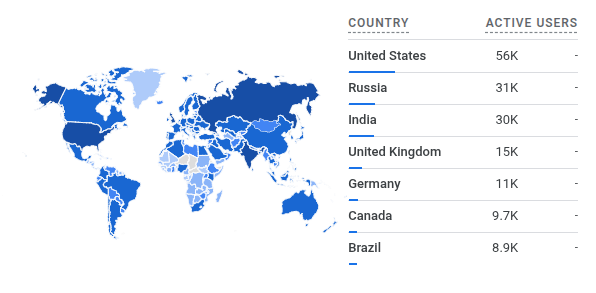
Only about 10% of users actually use the translated versions of the website (I guess because it requires an extra button click). Google also hates it if I auto-redirect people so I don’t. That said, as I shift to telling people about this project, I’ll start sharing it in non-anglophone corners of the internet and share the translated version of the tool.
Step 6: User feedback
I’ve also been silently trying to address user feedback. Most of the priority has gone to fixing bugs and issues, and I really want to keep this tool simple, and minimal, but a few improvements include:
- Respecting the input fps (if you upload a 24fps video, you get 24fps output video)
- Upscaling to non 2x resolutions (like if you upload a 720p video, you can get out a nice clean 1080p output)
Some issues are just really hard to fix like this one, but I’ve tried my best to fix the issues that most people have had and make improvements where I can.
Step 7: I added a paid version
You’ll notice now that I added some messages about “Fast AI Video Upscaler”, which is a paid alternative service that runs similar AI Upscaling models (same general architecture as the free models, just 100x bigger) on cloud GPU servers.
I like being transparent, and so while you may call me opportunistic, let me outline why I think adding a paid version is better for everyone, including free.upscaler.video users:
-
The paid version solves for the biggest pain point(s) with the free version: If you have a 1 hour long video, it’ll take 2-3 hours to process on your own device (which you can totally still do and plenty of people do), but it’s still annoying to have to keep your tab open, and that’s where server-side processing is a lot more convenient
-
The other pain point with the free version is limited quality. I’m not intentionally limiting quality, quality is correlated with size of the AI models being used, and if I use bigger models in the browser (the free version), it will crash people’s computers. The paid version runs these models on datacenter GPUs. If you happen to have a superpowerful GPU and feel like you could run AI upscaling networks on your device, check out Video2x
-
In either case, the fast version solves for a Gap in the market, for affordable upscaling options for longform video content. Every other tool uses much much heavier AI models which end up costing $50 USD to $100USD per hour of content, and so by optimizing for much smaller models and being smart about dynamic model selection, it’s the only goldilocks solution, for casual and pro-sumer users.
-
Incentives align: Not only is this paid version funding my startup now (which is giving me time to fix bugs and improve the free version), there is no conflict between the free and the paid versions. While Free AI Video Upscaler is marketing for the paid version, sure, I’d make far more money by making Free AI Video Upscaler the best free upscaling tool in the world, and growing from 50k Monthly Active Users to 500K Monthly active users, than trying to add friction and increase conversion by 20% in the short term. Search Engines track when users go to websites and whether they (a) got what they were looking or (b) Bounce and look for alternatives, and take that into account into their rankings. There’s no way to fake that, so the obvious conclusion is, if I want to make money, I need to make this tool the best possible free video enhancement tool on the internet, and give people exactly what they are looking for with as little friction as possible.
Roadmap
I get it, this is just a free tool to upscale videos. That said, trying to understand why people are using my tool despite the issue, I think it is because it’s genuinely a unique combination of (1) Free and unlimited, (2) Simple and easy to use.
Tools like Topaz Labs are overkill for casual users, marketers or content creators, and most of the ‘easy’ tools like Canva require sign up and have very restrictive limits.
Perhaps this is me being presumptuous, but now that I’m taking things seriously, I don’t see why this can’t be the #1 free video enhancement tool in the world. It doesn’t have to have the bells and whistles like Topaz Labs, or have a full creative suite around it like “Canva”. It just needs to be free, easy to use, and actually work.
In that spirit, I’m just going to focus on making sure it is (1) Simple (2) Free (3) Easy to use, and for future improvements I’m going to work on:
- Continue to fix bugs as I find them
- Making sure it works on as many devices as possible
- Release a mobile app, which would provide better/faster processing for mobile users
- Make the networks better, and improve the speed and quality
Community Contributions
You can help me improve the tool by providing feedback. Because this tool is so privacy focused and doesn’t require sign up, I often don’t know about issues unless people tell me about them.
I’m also not a marketer, content creator or video editor (some of the main buckets of people who seem to be using my tool, based on organic links where people have posted my tool on forums like Reddit), so if there’s something specific you need or would like to see, let me know.
If you like the tool, then please share it! Adding a like or review on websites like:
Otherwise, thanks so much for using the tool.